
Feature Overview: Setting Material & Labour Rates
BuildPartner allows you to set your own material and labour rates, ensuring every quote reflects your business’s actual costs rather than generic defaults, because even small inaccuracies in material or labour rates can significantly affect profitability over time. This guide explains how to configure your rates, helping you produce reliable cost plans.

Changing Your Labour Rates
Our rates for materials and labour are set to default rates. If you’d like to check these rates or make adjustments, you can override them for a specific project.
To change the labour and material rates of an existing project, head to the dashboard of the project you’re working on, and click the “£” icon. Then choose between Labour or Materials.
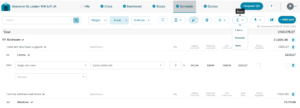
When choosing Labour, you can set rates for the following trades: carpenter, electrician, plumber, carpet fitter, decorator, plasterer, bricklayer, tiler, roofer, groundworker, Gas Safe engineer, and general builder.
To update a rate, select the relevant profession and enter the known hourly or daily rate in the “Cost/hr” or “Cost/day” field. When you update one value, the other will automatically update the “Rate/day”.
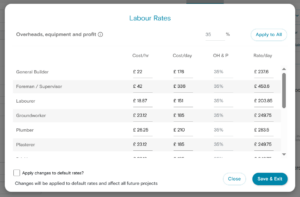
You can apply a flat percentage to the OH&P column for all trades by inputting a value in the uppermost field: “Overheads, equipment and profit”. Once the field has been edited, click “Apply to All”.
If you want to apply these labour rates to your default rates for new projects, tick the checkbox that says “Apply changes to default rates?” (Existing projects are unaffected by any changes you make on this page.)
When you’ve made the required changes, click “Save & Exit”.
If you want to change default values for every new project you create (and not an existing project), head to the dashboard and click the account icon in the top-right corner. In the dropdown menu, select the option “Labour rates”.
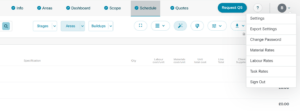
Clicking Labour Rates will reveal a page like the pop-up window we viewed a moment ago. To make a change, simply apply the relevant rate to the selected profession and hit Save.
The one difference on this page is the “Restore default rates” button, which restores the rates back to the BuildPartner system defaults.
Changing Material Rates
Changing material rates works in exactly the same way as changing labour rates, as described above:
- To amend the materials rates in a specific project, head to the dashboard in that project and click the £ icon to change the material rates.
- To change the default rates for all new projects, click the icon in the top-right corner and select Material Rates from the dropdown menu.
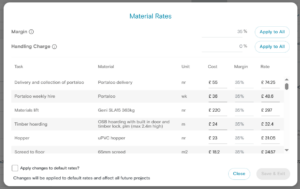
Whether you’re changing rates for a specific project or the default rates for all new projects, the first thing that you’ll likely notice is that this list is much longer than the labour rates list of professions. That’s because this list covers hundreds of materials, such as:
- Copper piping
- Loft insulation
- Power sockets
- Skirting
- Gas boiler
If you’re changing the default material rates (as opposed to the rates for a specific project), you’ll find a search option in the top left that allows you to search for specific materials. For example, if you search “toilet”, you’ll see a list of materials like pedestal toilet, toilet seat, and toilet roll holder.
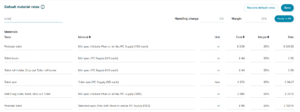
If you’d prefer to make a wholesale change to margin (%), you can do so in the “Margin” field; then select “Apply to All”. A handling charge is a fee/margin applied to cover the cost of transport and packaging of a client-supplied item.
Remember to hit “Save” before exiting the page.
Once your rates have been configured, BuildPartner will automatically use them when generating future cost plans and quotations to maintain consistent pricing across every project.
It’s also worth reviewing your rates periodically to capture fluctuations in prices, especially for materials with more volatile pricing, such as timber, copper, and other commodities.
We’re continually improving BuildPartner to make quoting projects easier, faster, and more accurate. If you’ve got feedback on changing default labour and material rates, or if there’s another feature you’d like to see added or improved, we’d love to hear from you. Get in touch at [email protected]